The problem
Selling websites to small local businesses is mostly prospecting. Someone scrolls Google Maps, copies phone numbers into a spreadsheet and checks each business’s website by hand. Then a caller phones and tries to describe a website the owner can’t picture.
That means:
- Lists go stale. A spreadsheet doesn’t notice when a business launches a site or its old domain lapses.
- Callers start cold. Nothing tells them which owner to call first, or what to say when they do.
- The pitch is abstract. “We’ll build you a website” is easy to turn down. “Here’s your website” isn’t.
- Follow-ups slip. Callbacks live in notebooks, and nobody knows whether the owner ever opened the link.

What LeadSweep does
LeadSweep runs the prospecting for you. Each step happens automatically, within the API budget you set, until a lead is ready for a person to call.
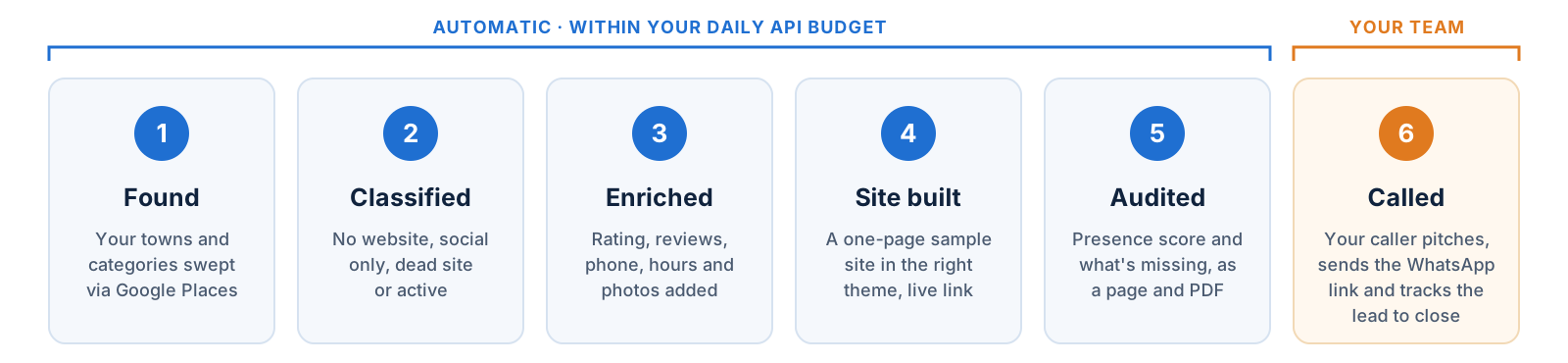
- Found. A scheduled sweep searches each town on your crawl plan, category by category, through the Google Places API. Chain and franchise listings are filtered out, and duplicates are flagged for merging.
- Classified. Each business is sorted by its web presence: no website and dead site are hot leads, social only is warm, and a working site is stored but not pitched.
- Enriched. Rating, review count, recent reviews, phone, opening hours and photos are pulled from the listing.
- Site built. LeadSweep generates a one-page site for the business in a theme that suits it, with rooms or services, reviews, a map and a WhatsApp button.
- Audited. A web-presence audit scores the business out of 100 and lists what’s missing, with a link and QR code to its sample site.
- Called. Your caller opens the lead, sees the call brief, sends the sample on WhatsApp and logs the outcome.
A sample site for every lead
The strongest moment in the pitch is the owner seeing their own business online. LeadSweep builds that site before anyone calls.
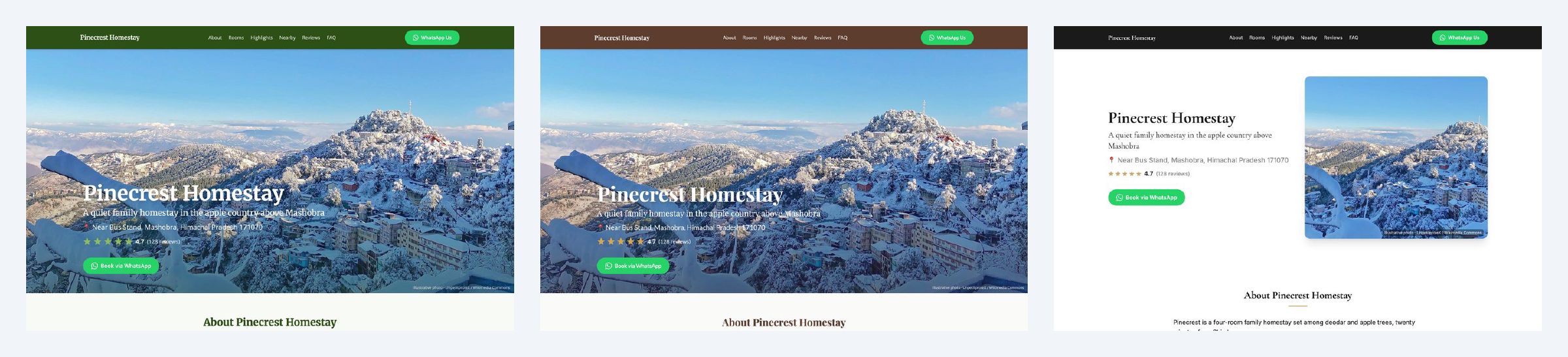
- One layout, many looks. Each category has one layout and several themes. Hotels and homestays have ten, from heritage to boutique to orchard stays.
- Built from real data. Name, rating, reviews, address, hours and photos come from the listing. Missing details are left out cleanly, never filled with guesses.
- WhatsApp first. The main button on every site opens a WhatsApp chat with the owner, which is how most small businesses here take bookings.
- Mobile ready. Most owners will open the link on a phone, so the sites are designed for one.
- Shareable before publishing. Send a private preview link that expires after 14 days, or publish the site on its own subdomain of your domain.
- You know when they look. Every view is recorded, and leads whose site was opened in the last week get a badge so callers ring while it’s fresh.

Built for every role on the team

For callers
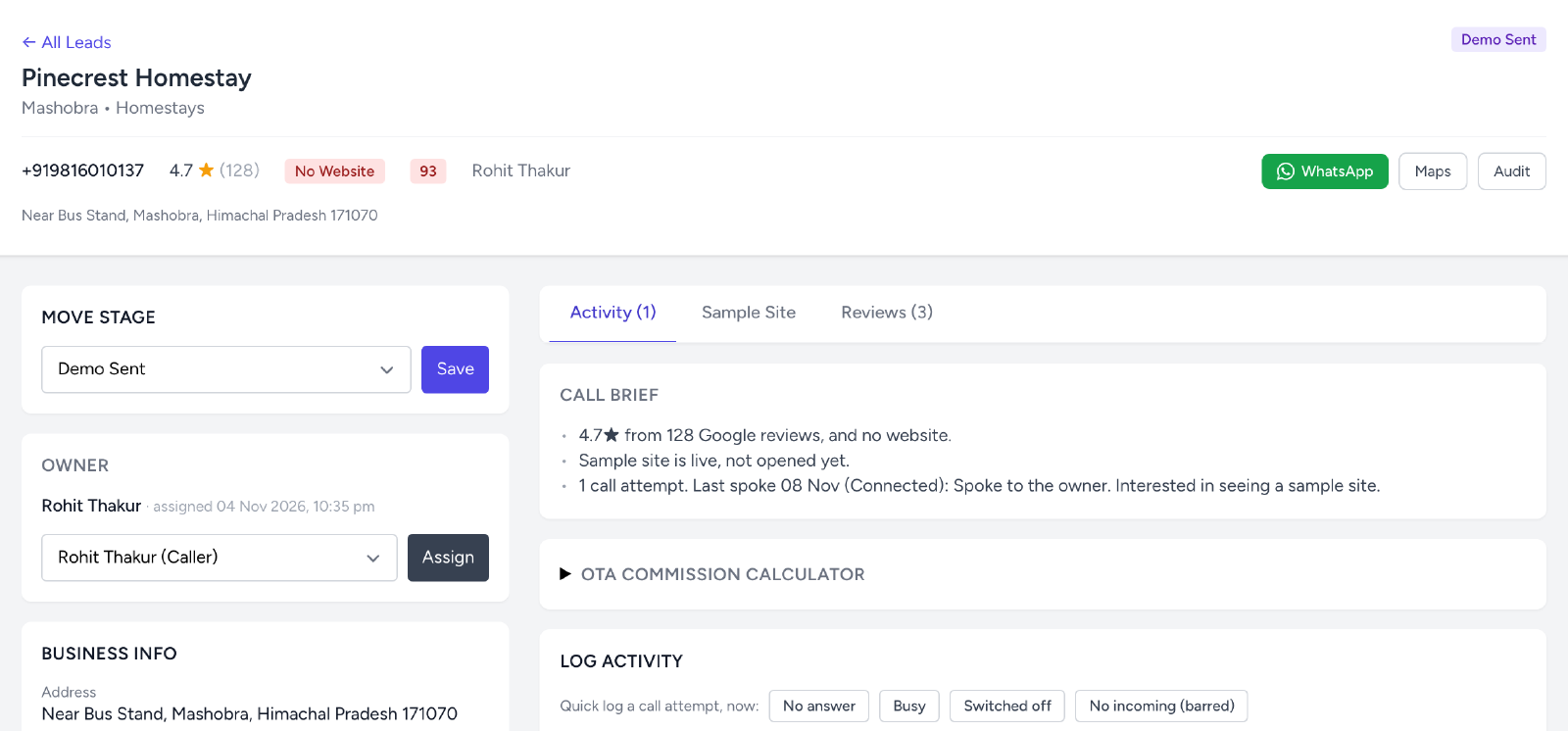
- A queue, not a spreadsheet. “My queue” lists the leads assigned to you, highest priority first.
- A call brief on every lead. Short lines on what to open with: the rating and the missing website, review quotes that mention booking or finding them online, and how many nearby competitors already have a site.
- A commission calculator for hotels. Show a homestay owner what they pay booking platforms in commission each month, and how few direct bookings would cover a website.
- One-tap call logging. Mark no answer, busy or switched off in one click, or log a full call with outcome, notes and a follow-up date.
- The pitch, written. A pre-filled WhatsApp message with the sample site and audit links, ready to send by hand.
For team leads and managers
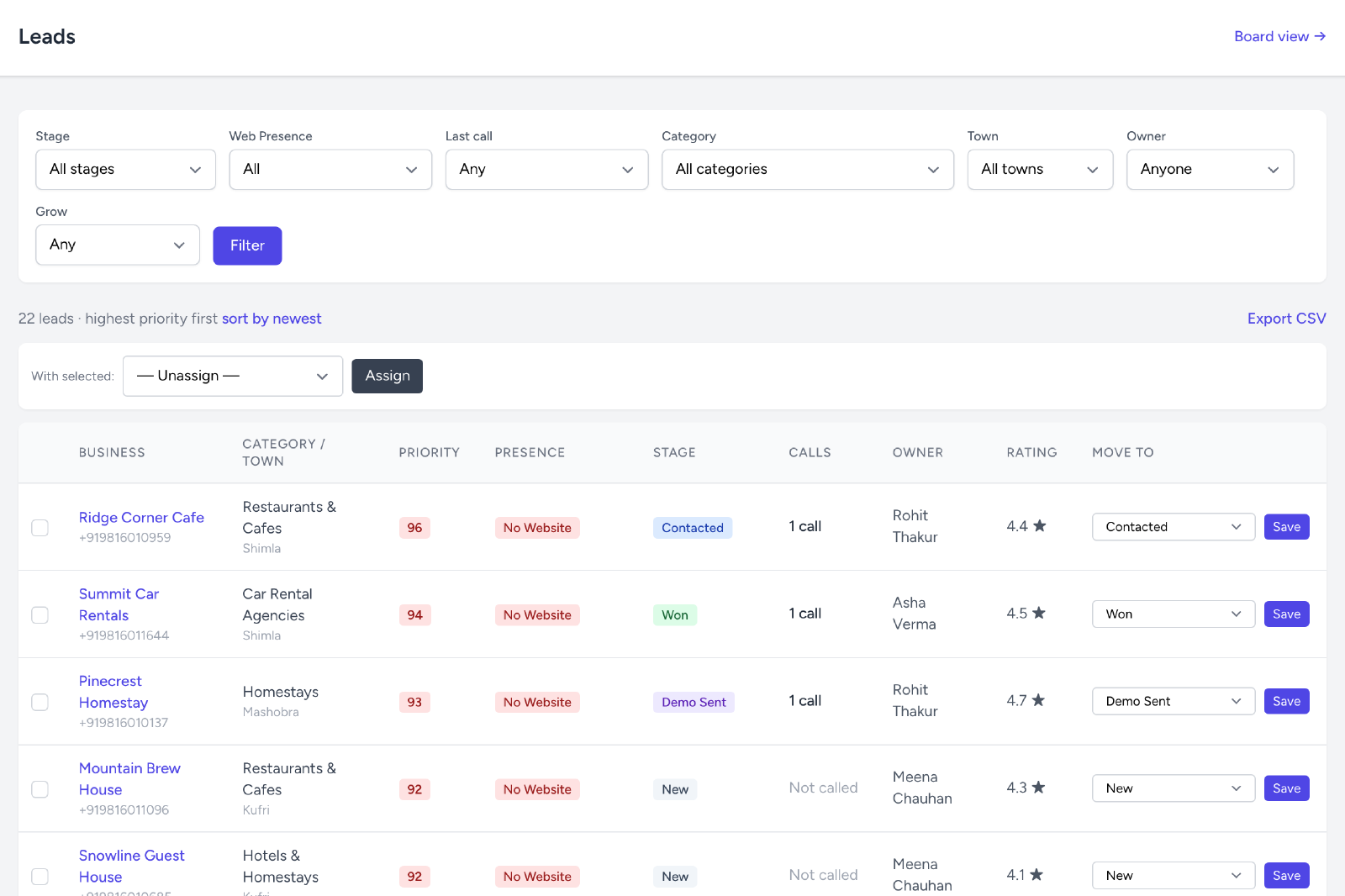
- Priority scoring. Every lead is scored from its rating, review volume and web-presence gap, so a well-reviewed hotel with no site comes before a new listing with three reviews.
- Assignment. Assign leads one by one or in bulk, and filter by stage, town, category, owner or last call.
- Pipeline stages. New, no answer, contacted, demo sent, visited, negotiating, won or lost, plus a holding stage for numbers that never pick up.
- Daily follow-up digest. An email each weekday morning with overdue and due-today follow-ups.
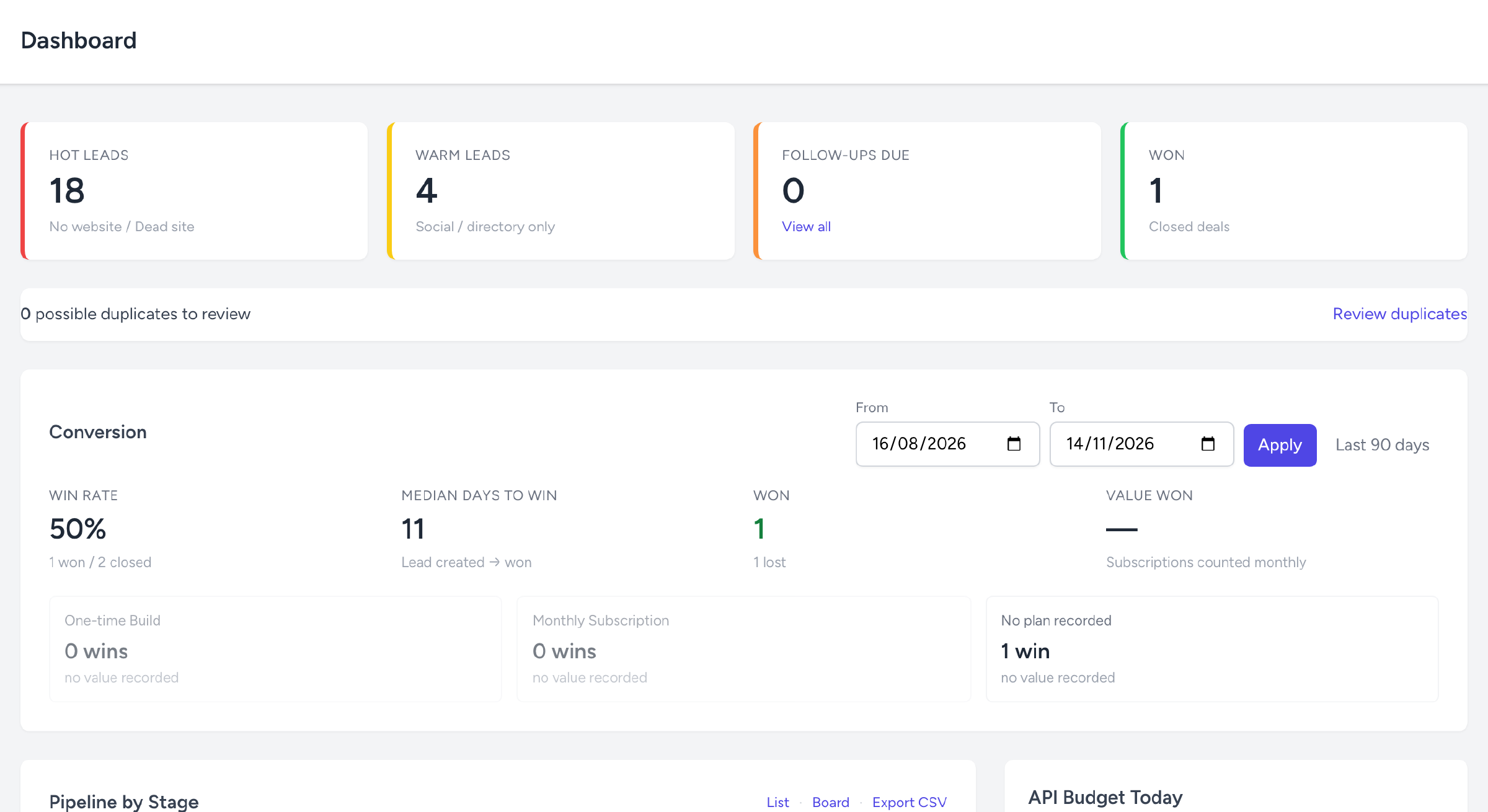
- Conversion reporting. Win rate, time to win, and wins by plan: one-time build or monthly subscription.
For the business owner you’re pitching
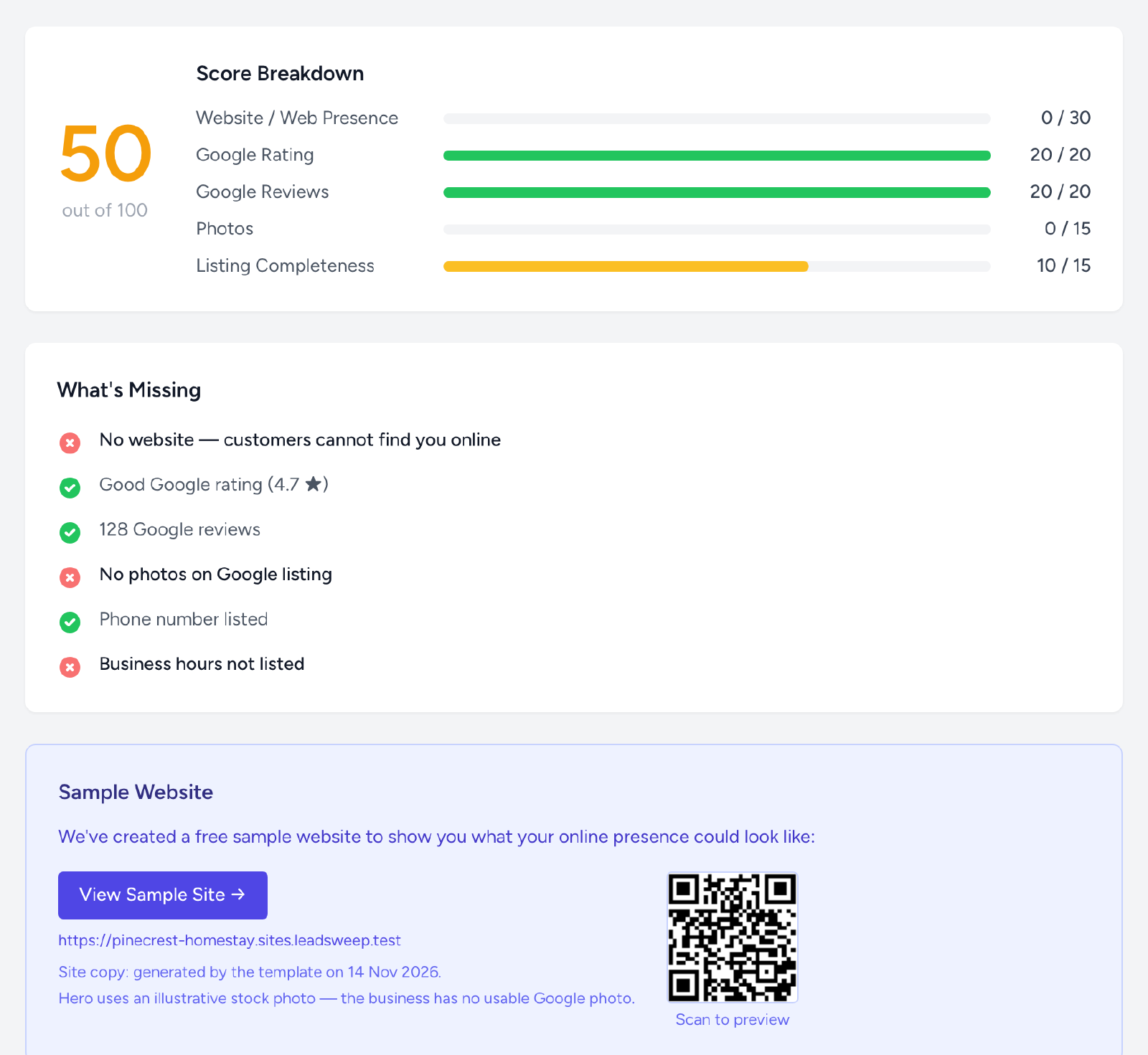
The audit turns “you need a website” into something the owner can see: a score out of 100 across website, rating, reviews, photos and listing completeness, a plain list of what’s missing, and their sample site one tap away. It’s available as a link or a PDF.
For admins
- Crawl plan and coverage. Choose which towns and categories to sweep, in waves, and see businesses, hot leads and wins by town and category.
- API budgets. Daily and monthly limits on Google API calls, with every call logged.
- Roles and sign-in. Admin, manager and caller roles, with Microsoft 365 sign-in for your staff.
- Clean data. Duplicate finder and merge, chain rules to keep franchise listings out, do-not-contact flags that survive every re-sweep, and filtered CSV exports.
- Job health. See failed or stuck background jobs and retry them from the browser.
Why agencies choose it

Nothing to install
LeadSweep is SaaS. Netgen hosts it, runs the sweeps and keeps it updated; your team only needs a browser and a login.
Every lead comes with a reason to call
A lead isn’t just a phone number. It arrives with a presence gap, a priority score, a call brief, a sample site and an audit, so the first call is about the owner’s business, not your agency.
Compliant by design
LeadSweep uses the official Google Places API only and follows Google’s attribution rules. There’s no automated messaging: a person sends every WhatsApp message.
Costs you control
Daily and monthly API limits, free ID-only search, and 30-day caching keep Google costs predictable. When a limit is reached, work waits for the next day instead of failing.
Lists that stay current
Businesses are re-checked over time. A dead site that comes back, or a business that launches its own site, moves out of the hot list on its own.
Any town, any category
Towns and categories are settings. Start with one town and one category, then grow district by district.
Results from our own team
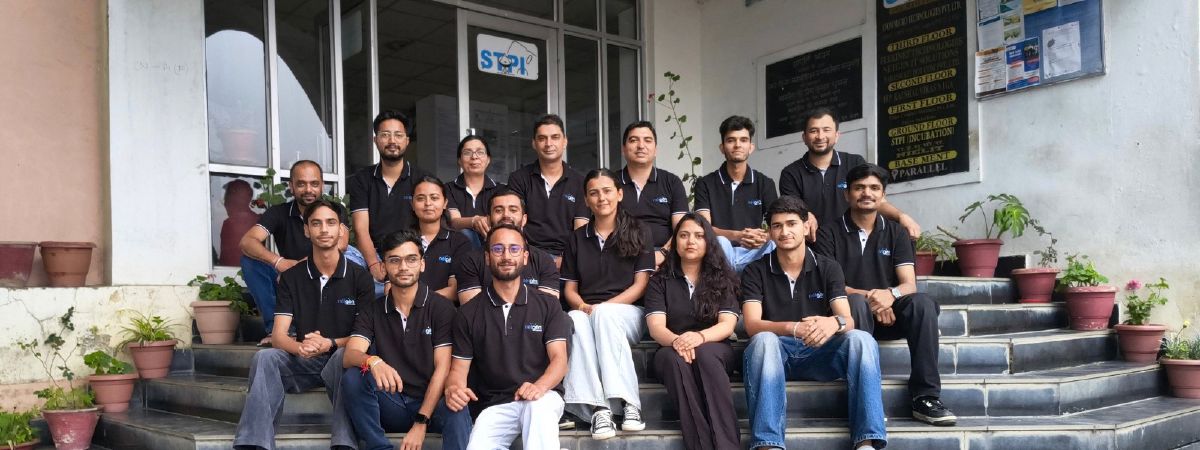
We built LeadSweep for Netgen’s own sales team in Shimla first, and run it every day.
- 14,593 businesses found across 58 categories and more than 500 towns and localities in Himachal Pradesh since 20 September 2026.
- 72% had no working website: 8,735 had none at all, 1,211 had a dead site and 525 had only a social media page.
- 11,167 leads in the pipeline and 8,898 calls logged by our callers.
- 299 sample sites generated for leads our team was working.
Read the full story in what we learned checking 14,500 Himachal businesses for a website.
How we work
The process, in order
- 01
Discovery call
We look at the towns you sell in, the kinds of businesses you want to reach and how your team works today.
- 02
Set up your map
We add your towns and categories to the crawl plan and set daily and monthly Google API budgets you're comfortable with.
- 03
Brand your pitch
Sample sites carry your agency's name and domain. We load your plan prices and your WhatsApp pitch message.
- 04
First sweep
LeadSweep harvests and classifies your first towns. We go through the lead list and sample sites with you.
- 05
Go live
Your callers get logins by role and start working the queue, highest-priority leads first.
FAQ